Growth Hacking Series: How Manago AI actually writes your marketing copy

Launch campaigns without leaving your AI workspace. See how Manago AI MCP works
The fifth prompt is usually where the promise of AI saving time starts to look a little shaky.
Getting a first draft is easy enough. Then comes the part where you ask AI to make it sound more like your brand, cut it down for SMS, turn the same idea into a Web Push notification, rethink the CTA because it now sounds slightly ridiculous out of context, translate everything for another market, and finally move the finished copy back into the platform where the campaign actually lives.
None of those jobs is particularly difficult. Put them together across a few campaigns, languages and channels, though, and you have created a surprisingly busy little workflow around a tool that was supposed to remove busywork.
There is a better way to use generative AI in marketing, and it starts before you ask it to write anything. In Manago AI, Brand DNA gives AI the context it needs to understand how your company communicates, while AI Sidekick works directly inside the tools used to create emails, SMS, Web Push notifications and onsite content. Instead of repeatedly explaining the brand and moving copy between windows, you can work on the campaign where it will eventually run.
A generic AI model can produce perfectly decent marketing copy, provided you give it enough context. Of course, enough context is doing a lot of work in that sentence.
A useful prompt might need to explain whether the brand is playful or serious, how it talks about customers, which product names should never be shortened, what sort of language feels too salesy, whether emojis belong anywhere near the copy and half a dozen other things that somebody on the marketing team already knows instinctively. Do this once and it is a prompt. Do it for every campaign and it starts looking suspiciously like admin.
Brand DNA moves that recurring context into Manago AI itself. It analyses the content and design of your website and builds a central brand profile that AI tools can draw from when creating new content. That profile covers how the brand sounds as well as how it looks, giving AI a much better starting point than another empty prompt box.
You do not need to turn a brand book into a 40-page prompt or manually copy every rule into the platform. Go to Menu → Integrations → Brand DNA, choose Generate Brand DNA, enter your website address including the https:// protocol and start the analysis. Once the result is ready, review it and save the profile.
Brand DNA captures the communication context AI needs when it writes for you: your company and vertical, tone of voice, product categories, preferred vocabulary and words that should be avoided. It also stores the visual side of the brand, including logo variants, colours, typography and button styling.
That visual layer matters because Brand DNA is not limited to writing copy. It connects with tools such as Email Design Studio and Web Engagement Studio, allowing new creations to inherit the brand styles that are already stored in the platform. Fonts, colours and other design choices do not have to be rediscovered every time somebody starts a new email, form or pop-up.
More importantly for our purposes here, it changes the way you can brief AI.
Without Brand DNA, a prompt might end up looking something like this:
Write an email announcing early access to our summer collection. Keep it friendly but premium, don't use the word “cheap”, call customers “members”, avoid exclamation marks, use our usual product terminology...
Once those rules live in Brand DNA, the useful part of the brief becomes much shorter:
Write an early-access email for existing members announcing our summer collection, with the collection as the main CTA.
The second prompt tells AI what is new about this particular campaign. The brand should not be new information every Tuesday morning.
That does not mean every generated sentence should go straight into a live campaign. Brand DNA gives AI a better understanding of what belongs to your brand, but the marketer still decides whether a particular message works for the audience, offer and moment.
That distinction is worth keeping because the point is not to take people out of the creative process. It is to stop wasting their time on the parts of that process that should already be understood.
Once that foundation is there, the more interesting question is what happens when you stop discussing AI in theory and actually need to get a campaign out of the door.
Email is a good test case because there is enough copy to make AI genuinely useful, but also enough moving parts to expose the limitations of simply pasting a generic AI draft into a campaign builder. There is the body copy, headline, CTA, subject line, preheader, imagery and usually at least one round of somebody saying, “Can we make this a bit less... marketing?”
Here is how that workflow can look inside Manago AI.
Before opening AI Sidekick, decide what the email is actually for. You do not need a creative brief worthy of an agency pitch, but AI still needs the campaign context that Brand DNA cannot know in advance.
Suppose an online sports retailer is launching a new running collection and wants existing customers to receive 48-hour early access. The brief could specify the audience, the early-access benefit, the new collection and the action recipients should take. That is enough to give the draft a direction without prescribing every sentence before AI has written one.
To get started, go to Menu → Channels → Email Marketing and open the Email List. From there, you can start a new email in Email Design Studio or use the AI Sidekick entry point next to an existing email or draft. Inside the editor, AI Sidekick is available in the side panel alongside the usual sections, text, buttons, product blocks and other widgets.
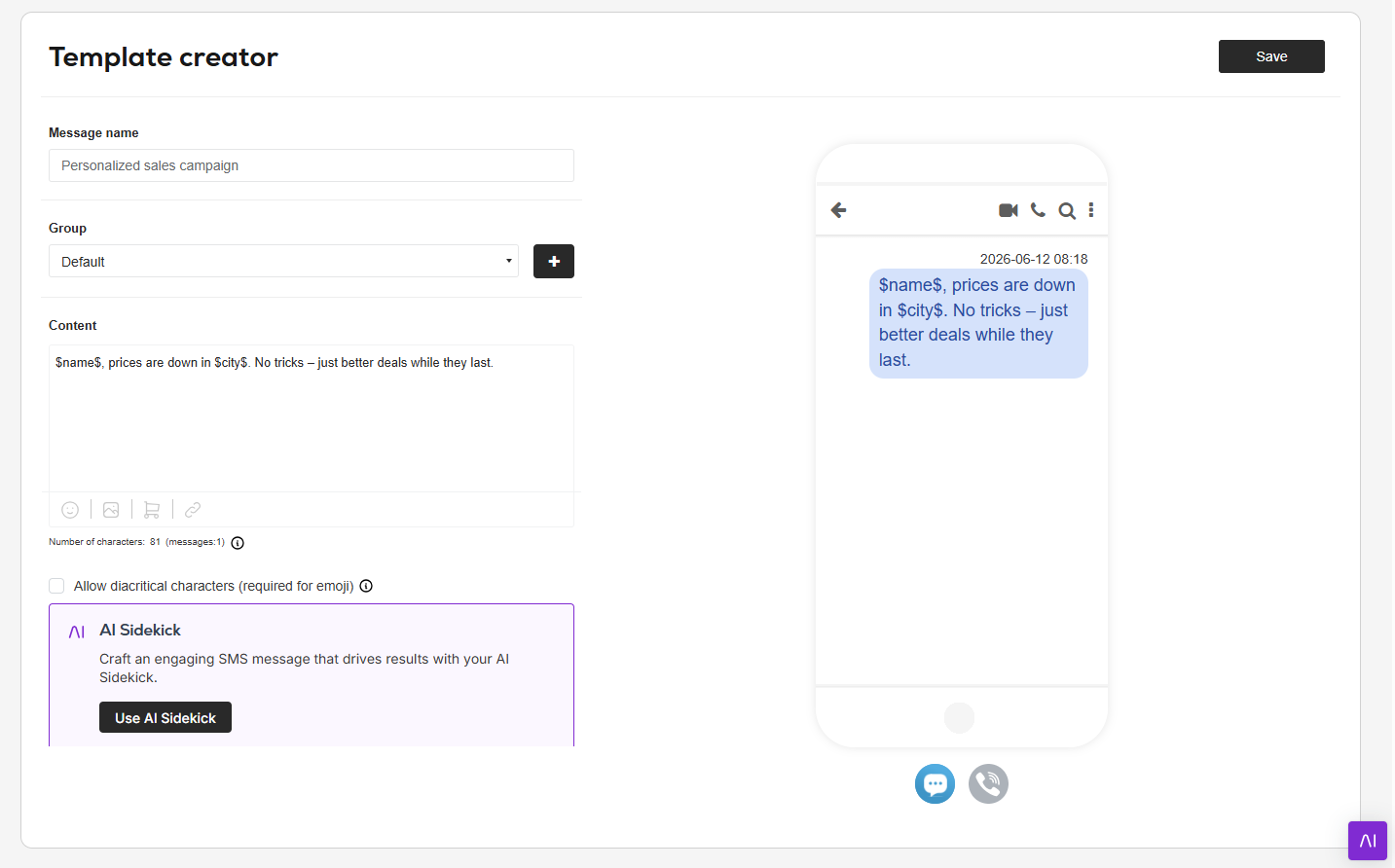
AI Sidekick gives you different tools depending on what needs doing. You can generate new content, create a catchy phrase or CTA, rewrite existing text or work on a specific fragment rather than asking AI to rebuild the whole email.
Give it the campaign brief and let it create the initial copy. Because Brand DNA already contains your tone, terminology and other brand rules, the prompt can focus on the message rather than explaining who you are from scratch.
Then edit it.
That sounds obvious, but it is probably the healthier way to think about AI copywriting in general. The goal is not to reach some mythical point where the marketer never touches the copy again. The useful shift is that human work begins with judgement and refinement rather than a blinking cursor and an empty content block.
The first version may have the right idea and still be too long, too eager, slightly repetitive or simply wrong for one section of the email. There is no reason to throw the whole thing away and return to another giant prompt.
AI Sidekick can rewrite existing content with a more specific objective, change its tone or produce another creative angle. Complete email templates can also be transformed into alternative versions, which is particularly useful when you want another direction for an A/B test without rebuilding the campaign from scratch.
This may be a less glamorous AI use case than “generate my entire campaign”, but it is probably one of the more useful ones in everyday marketing work. A lot of copy does not need inventing. It needs a stronger opening, a different angle or a version that stops making every product launch sound like the most important event since the invention of online shopping.
Once the email body is in decent shape, move on to the subject line and preheader rather than treating them as something to type five minutes before scheduling the send.
Email Design Studio includes an AI Subject Grader that helps assess the subject line before you send, alongside a character counter and personalisation options. AI can also generate up to three subject line options with matching preheaders, giving you several directions to work with rather than one supposedly perfect answer.
The important bit is still the choice. A subject line that looks great in an AI assessment but does not sound like your brand or misrepresents the content of the email is not suddenly a good subject line because AI likes it. Use the suggestions to broaden the options, then pick the one that makes sense for the campaign.
Copy is only one part of the draft. From the Image widget in Email Design Studio, you can open AI Sidekick, describe the visual you need and generate four image options without moving the campaign into a separate creative tool. AI can also help modify existing graphics, including changing backgrounds or working with text embedded in the image.
Once everything is in place, AI Email Review gives the finished email another pass. It checks the copy for issues such as grammar and spelling and suggests ways to improve the content before the final human review.
So the workflow is not particularly complicated:
Campaign brief → Generate → Edit → Subject & preheader → Visual → Review
And once that email exists, it can become a starting point for more than one inbox.
A campaign that works in email may also deserve an SMS, a Web Push notification or an onsite pop-up, but “repurposing” should not mean squeezing the email until it technically fits inside a smaller box.
For SMS, AI can turn an existing email campaign into an SMS variant rather than forcing you to brief the same campaign again from scratch. The copy is adapted to the constraints of the channel, including the required length and formatting, while the workflow also takes care of elements such as UTM parameters. The original campaign idea survives, but all the email-shaped padding quite rightly does not.
Web Push follows the same principle from another angle. AI can create short, engaging notifications suited to the format and adapt the message to different user behaviours, so the push is written as a push notification rather than as a heavily trimmed email subject line.
Pop-ups bring the website itself into the equation. In Web Engagement Studio, Brand DNA can be used when creating pop-ups, forms and landing pages, helping AI generate copy and styling that already fits the brand instead of treating each onsite element as a separate creative exercise.
The campaign idea can stay the same while the copy changes shape around the channel and the moment. That is the difference between actual repurposing and simply making the font smaller until everything fits.
A standalone AI writer can give you a first draft in seconds. That part of generative AI is no longer particularly unusual, and pretending otherwise would be a strange hill for us to die on.
The more interesting question is what happens after that first draft.
Campaign work is full of second, third and sixth versions. There is the shorter one, the SMS one, the German one, the one with a less aggressive CTA, the A/B alternative, the push notification and the version somebody asks you to “make a little warmer” ten minutes before the campaign meeting.
That is where keeping AI close to the campaign starts to matter. Brand DNA means the brand does not need to be explained again every time the format changes, while AI Sidekick lets you generate, rewrite, translate and adapt content in the same platform where that content will actually be used.
The marketer still decides whether the message deserves to go out. There is simply less copying, re-briefing and wrestling with blank boxes along the way.
Getting AI to write something was the easy part. Getting it to stay useful after the first draft is the better growth hack.


Your first year of SMS marketing probably looked brilliant. Click rates the email team could only envy, abandoned carts coming back fast, a revenue line that justified the budget on its own. Then, somewhere in year two, the numbers stopped making you smile. Opt-outs crept up. Revenue per send slid. The offer that worked last spring now gets a shrug and a STOP.
Read more
If you’ve ever come across the term "customer engagement platform", understood all three words clearly, but failed to get what they all mean combined together, don’t worry, you’re not exactly alone. Honestly it gets bandied around too much and we’ve seen it mean a bunch of different ideas. Three familiar words, one confusing product, and nobody seems in a h...
Read more
Most merchandising trouble shows up in the week before peak. Three people have edited the same category page in a fortnight, a range pinned for a supplier deal in August is still sitting in the top row, and when someone finally asks what the page is supposed to do, nobody can answer, because the answer was never written anywhere.
Read more