The ecommerce merchandising strategy nobody writes down (until it’s too late)

Manago AI is the new name for SALESmanago. Read our rebrand story here

Most merchandising trouble shows up in the week before peak. Three people have edited the same category page in a fortnight, a range pinned for a supplier deal in August is still sitting in the top row, and when someone finally asks what the page is supposed to do, nobody can answer, because the answer was never written anywhere.
Ecommerce merchandising is the set of decisions about which products shoppers see, where they see them and in what order, across the homepage, category pages, site search and recommendations. Most online stores make them daily and never write them down, and that gap is the difference between having merchandising tactics and having an ecommerce merchandising strategy.
This guide builds the missing document with you, one decision at a time, using a single example throughout: a homeware store with around 4,000 products, a small ecommerce team and a peak that runs from late November to Christmas. By the end you will have a document you can write in an afternoon and a calendar for keeping it true.
Ask who owns ecommerce merchandising in most teams and you get a pause. Buying decides what the store stocks and wants its new ranges seen. Marketing runs the campaigns and wants the homepage to match them. Product or digital teams own the templates, the search and the recommendation logic. Digital merchandising sits in the space between the three, and in many organisations it belongs to nobody in particular, which means nobody writes the rules and everybody edits the pages.
So where does merchandising belong in an ecommerce organisation? Our view is that it belongs inside the ecommerce team, with one named owner who answers for the store’s front end as a whole, while buying and marketing request changes. It can sit elsewhere and still work, provided somebody owns the document. What fails is the shared arrangement where three departments each assume one of the others is keeping track.
The second reason is subtler. Ecommerce merchandising decisions feel reversible. Changing a sort order takes ten seconds, pinning a product takes two clicks, and anything that cheap does not feel like a decision worth recording. Each change is reasonable when it is made. The cost arrives months later, when a category looks wrong, conversion has slipped and nobody can explain how the page reached its current state, because the reasons left with whoever made each edit.
At the homeware store, the merchandising team is really two people with other jobs: the ecommerce manager, who spends most of the week on trading and campaigns, and a buyer who checks the kitchen category whenever a new range lands. Neither would call themselves the owner, so the first line of the document is a name.
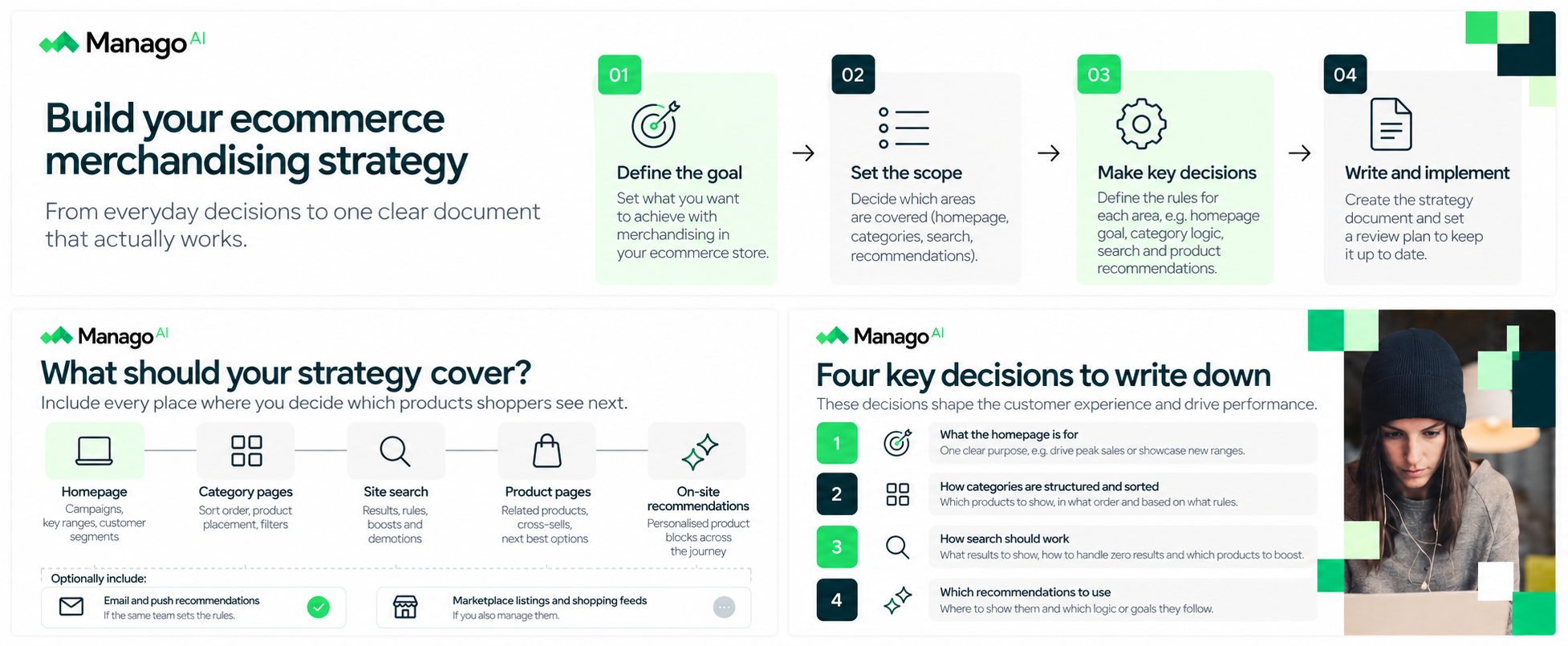
Scope is the least exciting page of an ecommerce merchandising strategy and the one that prevents most disputes, because ecommerce merchandising means different things to different teams.
For some it stops at category pages and promotions. For others it includes product blocks in emails, shopping feeds and marketplace listings. A document that does not say which applies will collect arguments about whose job a given page is.
For most online stores, a workable scope covers every surface where the store decides what a shopper sees next: the homepage, category pages, site search, product pages and on-site recommendations. Email and push recommendations sit at the edge. Include them if the same person sets their rules, and leave them to the CRM team’s own document if not. The homeware store draws its line around the website plus the product blocks in its abandoned-cart emails, because the ecommerce manager already controls both.
If you also run physical shops, write down where ecommerce merchandising and in-store merchandising agree and where they part. The campaign calendar and hero ranges usually match. Sort orders, out-of-stock handling and personalisation do not, because a shelf cannot rearrange itself for each customer and a category page can.
Most advice on merchandising in ecommerce covers these four areas as tactics to optimise. There is no shortage of ecommerce merchandising best practices for each of them, and they often disagree, because the right answer depends on your range, your margins and your customers. What your store needs is one answer per decision, written where everyone can find it.
Decide what the homepage is for, then write it down in one sentence.
Most homepages try to do four jobs at once: launch the campaign, show what is new, push a supplier’s range and greet returning customers. Without a stated purpose, every request for homepage space looks equally valid, and the page becomes whatever the last person to ask wanted.
The unwritten version is easy to spot. A campaign banner from September still runs in December, and nobody can say whether the page is built for new visitors arriving from ads or for regulars coming back to browse, so it serves neither kind of shopping experience particularly well.
A written answer for the homeware store reads like this:
“The homepage serves returning customers first. The top slot belongs to the current campaign, the next row shows what is new in the last 30 days, and everything below that is personalised from browsing and purchase history. Supplier-funded placements go on category and product pages, never the homepage.”
A stated purpose also gives ecommerce visual merchandising a standard to meet, since images and layout either serve that purpose or they do not.
Category pages are where most online shoppers browse, yet the default sort order is often whatever the platform shipped with, overlaid with a scatter of manual pins nobody remembers adding. When the default is unwritten, two things go wrong. Pins accumulate, because pinning is quick and unpinning requires someone to remember. And the sort order quietly works against the shopping experience you think you are offering: bestsellers by all-time revenue bury anything new, while newest-first pushes untested products above the ones customers already like.
Write the rule as a formula plus exceptions. For the homeware store:
“Default sort is a blend of 30-day sales and stock depth. New products get a two-week boost into the top two rows. Manual pins are allowed in the first eight positions only, each with an owner and an expiry date, and expired pins are removed at the monthly review.”
Expiry dates do most of the work. Site search results deserve their own line too, even if it simply says that search follows the category default unless a term has a recorded override.
Every promoted slot is borrowed from another product, so promotion always carries a cost, even when the promoted product pays well. Unwritten, promotion drifts towards whoever asked most recently or most loudly. Supplier deals, clearance pushes and campaign heroes compete for the same few positions, and products with thin margins end up in the slots that matter most. Cross-selling suffers in the same way: complementary products get chosen by habit, and the same three accessories appear under everything, which does little for average order value.
The written version sets a margin floor and names its exceptions:
“Nothing is promoted into the top four positions of a category below our 35% gross margin floor unless buying has flagged it for clearance. Supplier-funded placements are capped at two per category. Cross-sell slots show items customers actually buy together.”
The homeware store’s figures are illustrative and yours will differ. What matters is that the trade-off between average order value and margin is decided once, by someone accountable for both, and that cross-selling uses targeting based on what someone actually bought wherever your data allows.
Should out-of-stock products be hidden or kept visible? It depends on the category and on when the stock is coming back, which is exactly why the answer needs writing down. There are four real options, and each suits different conditions.
Hide the product from category pages and search when it is discontinued or will not return this season. Keep the product page live, mark it clearly as discontinued and point to alternatives, since the page may still attract search traffic.
Demote it to the bottom of the category when a restock date is confirmed within a few weeks. Shoppers who want that exact item can still find it, without it taking positions from products they can buy today.
Keep it in place with a back-in-stock capture for products with real demand and a firm restock date. If your supply chain allows it, taking orders with a longer delivery estimate works better still: Baymard Institute’s usability testing found email-me-when-available buttons far less effective than letting people order, and its benchmark found that 68% of sites do not allow orders for temporarily unavailable products.
Substitute when a close equivalent exists, such as another white duvet cover in the same size. The same research found that when users were only told a product was out of stock, around 30% were likely to abandon and look elsewhere, so a visible alternative matters most where products are interchangeable and the shopping experience would otherwise end at a dead page.
The homeware store’s rule:
“Lighting and furniture are demoted if the restock is under four weeks away and hidden if it is longer. Bedding is substituted with the nearest size and colour. Seasonal decorations are hidden on 27 December. Our 20 bestsellers stay in place, take backorders and show the delivery date.”
The four decisions need owners as much as answers. This is the ownership half of your ecommerce merchandising document, filled in for the homeware store. Copy the structure and replace the roles with the people in your own merchandising team.
| Decision | Who decides | Who can override | Reviewed |
|---|---|---|---|
| What the homepage is for | Ecommerce manager | Head of marketing, for campaign launches only | Each season |
| Default category sort order | Ecommerce manager | Category buyer, through pins with an expiry date | Monthly |
| What gets promoted, and the margin floor | Ecommerce manager and head of buying together | Commercial director, in writing | Each season, with the floor checked monthly |
| What happens to out-of-stock products | Category buyer, per category | Ecommerce manager during peak | Monthly, and weekly during peak |
A written ecommerce merchandising strategy that nobody revisits goes stale within a quarter. Ranges change, a campaign rewrites the homepage, a supplier deal ends and its pins stay behind. Give the document a rhythm, and attach a decision to every point in it, because a calendar entry that produces no decision is a status update, and status updates are the meetings people stop attending.
Most published thinking on merchandising calendars comes from physical retail, built around floorsets and planograms. The logic carries over to online merchandising while the vocabulary does not, and for an online store four horizons are enough.
Annually, set the shape of the trading year. Decide which peaks matter, what the homepage is for in each of them and where the margin floor sits. It is also the moment to look at where ecommerce is heading and ask whether any of it changes your rules. The homeware store does this in January and names three peaks: the spring refresh, the back-to-university weeks and the run from Black Friday to Christmas.
Seasonally, confirm what the next peak needs. Six to eight weeks before each peak, reread the four decisions against the coming season. Which categories need a different out-of-stock rule? Which supplier placements are booked? Set a freeze date after which manual changes to category pages need the owner’s sign-off.
Monthly, check what has drifted. Remove expired pins, compare each category’s order against the written default, list products that have not appeared in a top position all month and check that the margin floor still holds against current supplier terms. The output is a short list of corrections, made that day.
Weekly, handle exceptions. A bestseller sells out, a search term starts returning nothing, a campaign moves forward by a week. Resolve each one against the written rule, and if a rule keeps producing the wrong answer, put it on the monthly list for rewriting instead of overriding it again.
The calendar tells you when to look. This part covers what to look at, and it starts with an uncomfortable fact about most ecommerce merchandising reporting: it shows you what sold, not what was shown. You cannot judge a placement from sales data alone, because the placement is the input you changed.
Four measures give a better read of whether your ecommerce merchandising is working:
Category page conversion against its own baseline. Compare each category with its own previous quarter, not the store average, so a change in sort order shows up where it happened.
Search queries that return results and get no clicks. These point to search results ordered badly for what people meant. Queries with no results deserve a separate list, since Baymard’s benchmark found that about half of ecommerce sites handle “no results” pages in ways that frustrate users.
Products that never appear anywhere. Anything in stock that has not shown in a top position, a recommendation or a search result for 30 days is invisible inventory. Either the rules are hiding it or the range does not need it.
The gap between what is promoted and what sells. If promoted products convert no better than the rest of their category, the promotion rule is spending positions for nothing.
Attribution helps on the commercial side by showing which channel earned the sale, but it will not tell you which placement did. For that you need to view data by position. If your current tools cannot provide it, record that in the document as a known gap.
Some ecommerce merchandising cannot be placed by hand. Once a store has a few thousand products and customers with different histories, the most relevant items for each person change too often for any team to set manually. Recommendations and personalisation cover that part, and in Manago AI they run on the same customer data as the rest of the platform: behavioural and transactional data stored in each customer’s CDP profile, combined with your product feed.
Manago AI places recommendation frames on the website and in emails, pop-ups, landing pages and web push notifications, using strategies such as cross-sell, upsell, recently viewed, bestsellers, frequently purchased together and back-in-stock alerts. Anonymous visitors can see personalised recommendations as well, which matters on the first visit, when there is little customer data to work with. Each strategy can be limited by product attributes, categories, price ranges and customer interests, fallback strategies take over when the main logic cannot find enough matches, and views, clicks, transactions and revenue are tracked by placement. That last point gives the review loop the “what was shown” data that sales reports leave out.
None of this replaces the written strategy, because personalised recommendations are one of the decisions in it. Someone still has to write down where frames appear, which categories and price ranges they may draw from, and how they sit alongside the promotion rules. The homeware store’s line reads: “Product pages carry one cross-sell frame and one recently viewed frame. Cross-sell draws only from the same room category and from the same price range or above.”
You can see the full set of options in how Manago AI handles product recommendations.
One named person in the ecommerce team should own it: a digital or ecommerce merchandising manager in larger stores, the ecommerce manager in smaller ones. Buying, marketing and product can request changes and hold override rights for specific decisions, but the document and the default rules have a single owner. Shared ownership is how the rules stop being written in the first place.
Two to four pages is enough for most online stores: a short scope, a page for the four decisions, one for the ownership table and calendar, and the rest for category-specific rules. Much longer than that and nobody rereads it before peak. Write rules, keep the reasoning in a separate note if you need it, and make every line something a person could act on.
The default sort rule should change rarely, once or twice a year at the annual or seasonal review. Positions within a category will move constantly if the rule uses recent sales and stock, which is the reason for having a rule. Manual pins sit in between, so give each one an expiry date no more than 30 days out and review the whole category monthly.
Yes, and it can fit on one page. Most writing on merchandising for ecommerce assumes a large team with a dedicated merchandiser, yet small teams suffer most from unwritten rules, because the same two or three people make every change and assume the others know why. A one-page version covering the four decisions and their owners takes about an hour to write.
Marketing brings people to the store, and merchandising decides what they see once they arrive. The overlap is the homepage and campaign landing pages, so the homepage decision needs an explicit rule about when marketing can take it over. Category pages, site search and recommendations belong to ecommerce merchandising.
Go back to the week before peak, with three people editing the same category page. In a store that wrote its rules down, that week looks different. The page has a stated purpose, the pins have expiry dates, the out-of-stock rule for the season’s bestsellers was agreed in October, and the person who owns the document can settle a disagreement by pointing at a line. Both stores may run on identical digital merchandising tools. What separates them is whether somebody sat down months earlier, while there was still time to think, and wrote the decisions down. Start your ecommerce merchandising document with the scope, the four decisions and the ownership table, write one sentence for each, put a name next to it, and book the first monthly review before you close the document.



Weekly and monthly reports are among the most predictable work in marketing. Everyone knows when they are due, which numbers they should contain and whose desk they will land on. Even so, most teams still put them together by hand and start from scratch every time: an export from the dashboard, a comparison with the previous period, a few questions to the AI agent, t...
Read more
This happens all the time. At some point, most marketing automation programmes you've built reach a stage where nothing is broken, but something still feels off. The flows fire on time, the dashboards look healthy and automated revenue keeps edging up, yet if you read a week of your own messages back in order, across email, SMS and web push, they sound like a sy...
Read more
Erickson worked with Manago AI on purchase-history segmentation, dynamic product recommendations and a flagship automation workflow for its most engaged professional readers.
Read more