#Growth Hack Series: How to Use Lead Scoring to Predict and Prevent Customer Churn

Don’t let costs slow your growth. In Q4 We cut prices by half. Claim your offer
For any eCommerce marketer, one of the most frustrating challenges is the "silent churner." This isn't the customer who complains; it's the once-loyal advocate who slowly disengages, drifting away quietly until their absence is only noticed in a quarterly report. By then, it's often too late.
We tend to think of lead scoring as a tool for acquisition—a way to identify hot new prospects. But what if we flipped that logic on its head?
This growth hack will show you how to transform your contact scoring system into a powerful, proactive retention engine, allowing you to predict which customers are at risk and automatically intervene to save them.
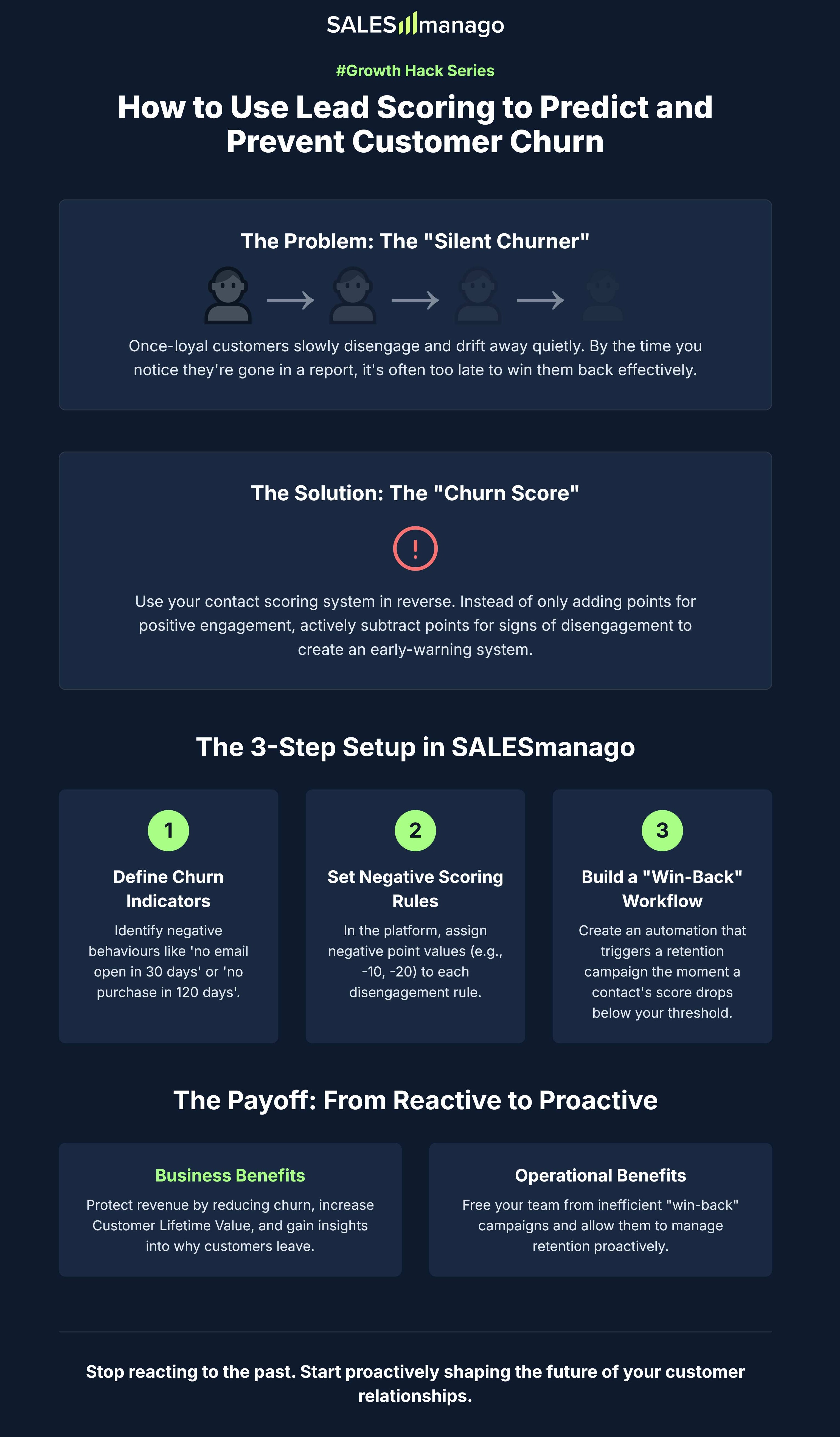
The typical churn scenario is a slow fade. A customer who used to purchase monthly stops visiting your site. They stop opening your emails. Because there's no single, dramatic event, no alarms are raised. Their departure goes unnoticed until they've been inactive for months, by which point winning them back with a generic "we miss you" campaign is expensive and rarely effective.
>> Read about other great hack - how to use AI recommendations in fashion eCommerce
This reactive approach to retention is a significant drain on your resources. "Win-back" campaigns for long-lost customers are notoriously inefficient, with low success rates. The true cost isn't just the lost revenue from that one customer; it's the negative impact on your overall Customer Lifetime Value (CLV) and the high cost of acquiring a new customer to replace them—a cost that is always higher than retaining an existing one.
The core idea is to use your contact scoring system in reverse. Instead of only adding points for positive engagement (like opening an email or visiting the pricing page), you will actively subtract points for signs of disengagement. This creates a dynamic "Churn Score" that acts as an early-warning system, automatically identifying customers who are silently drifting away long before they officially churn.
Before you touch the platform, the first step is strategic. You need to define the key signs of disengagement for your specific business. These are the negative behaviours that signal a customer is losing interest. A good starting point includes a mix of email, website, and transactional inactivity. Common examples are:
A contact has not opened any email in the last 30 days.
A contact has not clicked a link in any email in the last 60 days.
A contact has not visited your website in the last 90 days.
A contact has not made a purchase in the last 120 days.
Now, let's translate these indicators into rules. Navigate to the scoring section of the platform, typically under Settings -> Scoring, and select "Add new rule". Here, you will create a separate rule for each of your churn indicators, assigning negative point values. The key is to weight the scores based on the severity of the disengagement.
Here’s how you would set up a rule for purchase inactivity:
Select the event: Choose Contact has not made a purchase.
Define the time period: Enter in the last 120 days.
Set the scoring: In the "Scoring" field, enter a negative value, for example, -20 points.
Save the rule.
Repeat this process for all your churn indicators, assigning different negative scores (e.g., -10 for email inactivity, -15 for website inactivity). This system means a customer's score will dynamically decrease as their disengagement grows, giving you a real-time measure of their churn risk h(For more sophisticated scenarios, you can use tag scoring to differentiate customer behavior and tailor your approach).
Finally, you need to create an automation workflow that acts on this data. Go to Automation -> Automation Processes and create a new workflow.
Set the Trigger: The start of your workflow will be the Event Contact scoring has changed.
Add the Condition: Immediately after the event, add a Condition element: Scoring. Configure this condition to be less than -30. This means the workflow will only proceed for contacts whose score has just dropped below your critical churn threshold.
Define the Action: Following the "Condition: Yes" path, add an Action element. A great first action is Add tag to contact and create a new tag called At_Risk_Churn.
From here, you can build out a multi-stage retention campaign. For example, the workflow can immediately send a personalised "We've missed you" email with a special offer, wait a few days, and if there's no response, send a follow-up SMS. This isn't a generic blast; it's a context-aware journey triggered at the perfect moment to save a valuable customer.
This strategy has a direct and measurable impact on your bottom line. It protects revenue by reducing customer churn, increases overall Customer Lifetime Value by extending the lifespan of your customer relationships, and provides invaluable insights into the root causes of disengagement, allowing you to improve your entire customer experience.
For your marketing team, this automated system is a game-changer. It frees them from the manual, last-ditch efforts of trying to win back already-lost customers. It allows them to manage retention proactively and efficiently, ensuring their time and budget are focused on the right customers at precisely the right moment to make a difference.
The most successful eCommerce brands don't just get good at finding new customers; they get brilliant at keeping the ones they have. The "Churn Score" hack is a powerful, practical, and easily implementable strategy that transforms your marketing automation platform from a simple messaging tool into a true engine for long-term, profitable growth. It allows you to stop reacting to the past and start proactively shaping the future of your customer relationships.



Black Friday has always been where marketing plans meet reality. This year, more of that meeting happens before a shopper reaches the site, in places that report back very little about what was decided there. The signals marketers still collect are getting thinner and harder to interpret, and more of them now come with conditions attached. Shoppers, meanwhile, increa...
Read more
Black Friday falls on 27 November this year, which leaves most eCommerce teams about three weeks. Three weeks is enough to fix the things that usually break at peak: a slow checkout, a segment nobody finalised, a discount that would not survive a legal check, a support inbox with no answers prepared.
Read more
Ask what headless means and you will collect at least three answers, each delivered with complete confidence. Some mean a storefront that pulls content from a back end through an API. Some mean a platform with its own pop-ups and templates plus a set of APIs for anyone who wants to render things elsewhere. The newest group means AI assistants that log into nothing an...
Read moreStart your free trial and use AI to turn customer data into personalised experiences that drive growth.
No credit card required.