AI Recommendations: how Manago AI fills a product frame

Manago AI is the new name for SALESmanago. Read our rebrand story here


A recommendation frame may look simple from the outside: six products shown to one customer at one particular moment. What appears in those six slots, however, is the result of several decisions made in sequence. Some belong to the recommendation model itself, while others are controlled by the strategy around it: which products are allowed into the frame, what happens when there are not enough recommendations, how the final selection is ordered and whether unavailable products should appear at all.
Manago AI separates product recommendations into two layers. The model layer decides which products are most relevant to a particular customer. Depending on the setup, this can use statistical scenarios based on patterns across the customer base or custom AI models trained on your own data against a specific business objective.
The strategy layer controls what happens around that selection. It defines which products are eligible, how shortages are handled, how products are ordered and whether out-of-stock items can be displayed. This is handled in the Recommendation Architect, and the same strategy logic applies regardless of which recommendation scenario sits underneath it.
That distinction matters because poor results do not always mean the model is choosing badly. A filter created six months ago can quietly remove half of a perfectly good recommendation set, so before changing the model it is worth checking what the strategy is doing with its output.
The machine learning engine behind Manago AI's statistical recommendation types analyses individual customer behaviour, purchase history and relationships between products within the catalogue. It does not depend on somebody manually defining which products belong together. Instead, it looks for patterns in customer activity and uses them to generate several types of recommendations.
Collaborative filtering works in two directions. Product to product looks at how frequently and with what probability products occur together. The products do not have to be similar or belong to the same category, which means the engine can identify relationships that would not necessarily appear in a merchandising rule.
User to product works from a different angle. It looks at customers with similar behavioural profiles and uses their interests to identify products another customer may also find relevant. In both cases, the recommendations are based on observed behaviour rather than assumptions about what should logically go together.
This scenario works from several products the customer has viewed, rather than from the product currently on screen. It analyses what other customers who viewed a similar set of products went on to purchase and uses those purchases to build the recommendation set.
This makes it useful when you want recommendations to reflect a broader browsing pattern rather than a single product interaction.
These scenarios use the same general principle but look at different behaviour. Most frequently viewed together identifies products commonly viewed during the same browsing activity, while most frequently bought together looks at products that tend to appear together in purchases.
Mixed scenario combines the statistical scenarios into one ranking. Products most likely to be purchased come first, followed by products the customer is likely to view.
This gives the strategy a commercial bias without replacing the behavioural data underneath it. These relationships can also reveal combinations that would be difficult to spot through category logic alone, especially in product-to-product scenarios where customers regularly buy or view items together even though a merchandiser might never have grouped them.
AI scenarios also let you choose the time range used to analyse behavioural data: All, Monthly or Weekly. It is a small setting, but a useful one when shopping behaviour changes with the season. A shorter window can give more weight to recent patterns, while a broader one keeps more of the longer-term history in the recommendation logic.
The engine does need enough data to identify these patterns. It uses transaction data recorded as purchase events, the product XML feed and website visit data. If current transaction history is too limited, historical transactions can be imported from the e-commerce platform before implementation to provide a stronger starting point.
The recommendation engine also includes an analytical panel that helps teams understand what sits behind its recommendations. It shows how much of the contact database is covered by recommendations and includes a relationship graph between categories and products, where the thickness of the connections indicates recommendation power.
There is also a view of the most frequently recommended categories, including the ratio between recommended and non-recommended products within each one. That makes the panel useful beyond campaign optimisation. If most products in a category are consistently absent from recommendations, the pattern may tell the merchandising team something about customer demand or the assortment itself.
Statistical recommendations describe patterns already present across the catalogue and customer base. Custom AI models go further by learning individual behaviour against an objective chosen by the business.
AI Recommendations uses custom models created specifically for your organisation. A model can be trained towards one of three objectives: maximising the probability of purchase, maximising purchase value, or maximising the probability that a product is viewed. The models are retrained regularly, daily or weekly, so recommendations keep up with changing behaviour.
The process starts by defining the objective rather than choosing a model configuration. You describe what the placement should achieve, and the model is built for you, either by the AI agent in the platform or by our team. Before training, the contact properties, product catalogue and recent purchase events are analysed for coverage and quality, so a data gap is spotted before the strategy goes live, not after. This is also a feasibility check. If the available data cannot support the objective, the problem can be identified before the model is trained rather than after the strategy has already been running. Once the data is ready, model training itself.
Choosing the objective is one of the most important commercial decisions in the setup because it directly affects what the customer sees. A model trained to maximise the probability of purchase will not necessarily select the same products as one trained to maximise purchase value. Both can be correct for exactly the same customer because they are solving different problems.
That is why the placement matters. A recommendation designed to convert a hesitant shopper may need one objective, while a recommendation shown to somebody already likely to purchase may be better suited to increasing basket value. AI Recommendations brings this objective directly into the optimisation process, so the model can be tuned for a specific result such as purchase likelihood or purchase value rather than general relevance.
You can run several models, each for a different commercial job. In practice, this makes it possible to create narrower models for different commercial jobs: one for a product page, another for a post-purchase email and another for a category where margin matters more than volume. Trying to make one model serve all three means asking it to optimise towards an average of different objectives, and that average may not match the purpose of any individual placement.
Recommendation strategies do not always have to begin in the configuration wizard. AI in the platform uses natural language processing to help configure intelligent product recommendations from a written description of what you want to achieve.
Instead of manually assembling the first version of the strategy, you describe the intent and review the configuration created by the system. The result is still a normal strategy that you can inspect, change and refine, so the decisions covered throughout this article still apply. AI simply provides the starting configuration rather than hiding the logic from the marketer.
If you do not want to start from scratch, ready-made templates provide another route alongside the wizard and AI. Choose the closest starting point and adjust the strategy to the placement, audience and commercial objective rather than building every configuration from zero.
The practical benefit is speed. If creating another recommendation strategy takes minutes rather than an afternoon, there is less reason to use one generic setup across very different placements. Teams can create and test alternatives without turning each variation into a separate implementation project. Our guide to building strategies in the Recommendation Architect goes further into creating and reusing recommendation logic.
Whichever recommendation engine you choose becomes the base scenario in Recommendation Architect. For a custom model, you select AI Recommendations and then choose which trained model should be used. From there, Recommendation Architect determines how the model output becomes the final frame.
A few rules are particularly important because they can materially change the result even when the underlying model remains exactly the same.
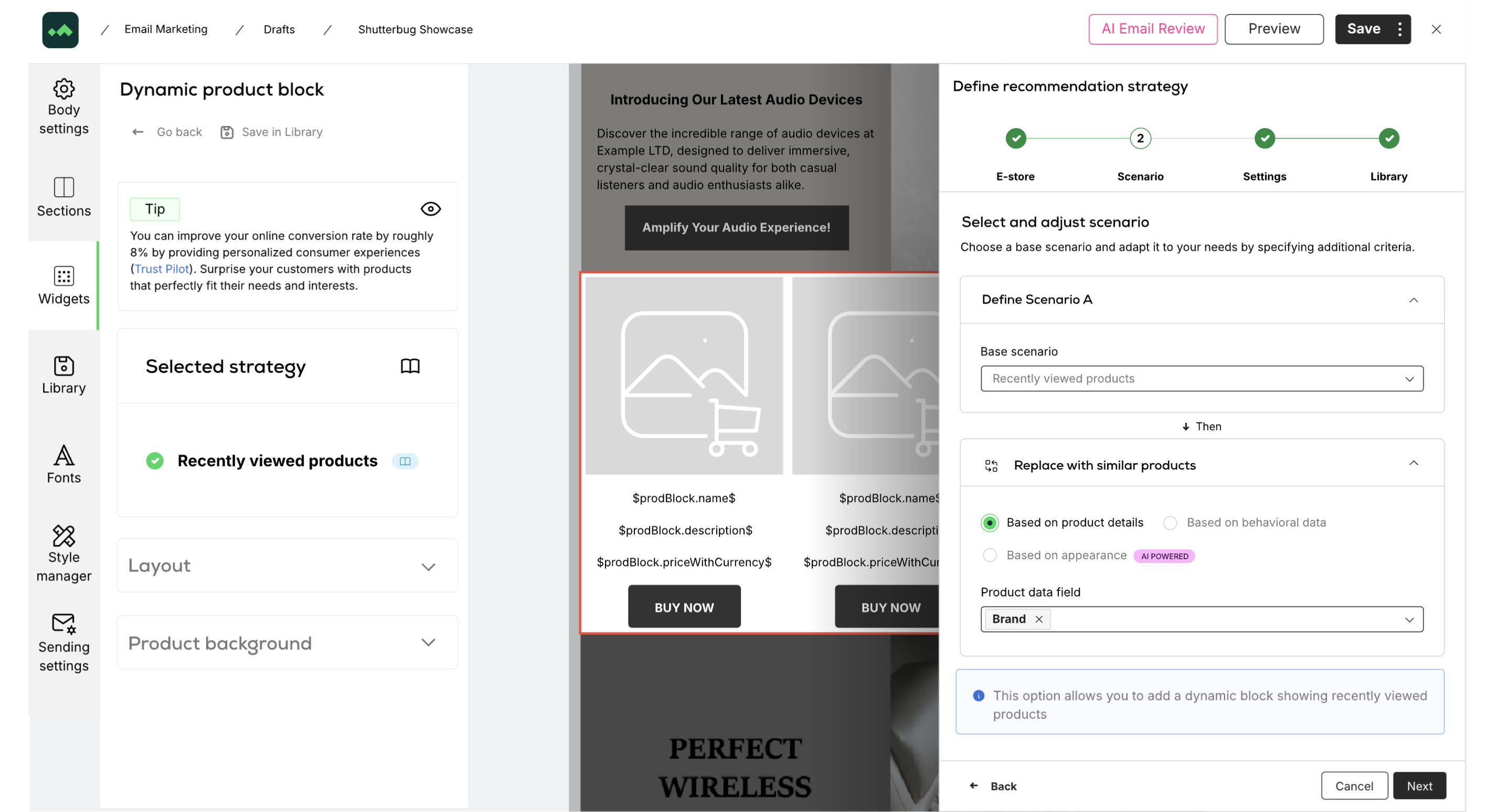
Each modifier works on the product set returned by the previous step, not on the original catalogue. That means the order of modifiers changes the outcome, so a strategy that filters first and modifies afterwards can produce a different final selection from one applying the same operations in the opposite order.
When troubleshooting a recommendation strategy, it is therefore more useful to look at the whole sequence than to evaluate each modifier in isolation.
Filter keeps or excludes products from the selection returned by the model. The model still decides which products are relevant; the filter simply limits what is allowed through. That makes it useful when you want to apply a commercial constraint without replacing the recommendation logic itself.
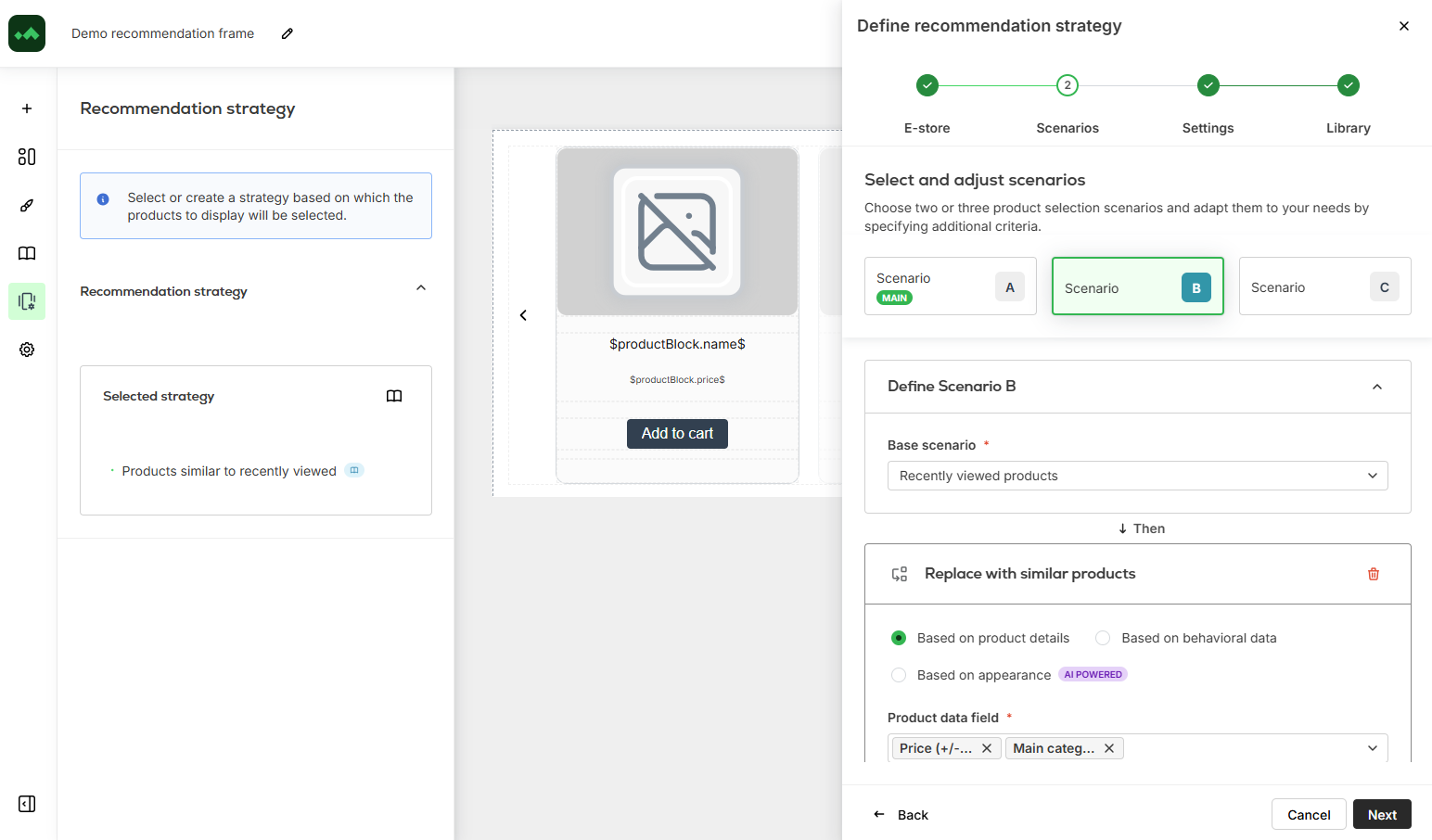
Replace with similar products behaves differently because it substitutes products selected by the model with alternatives sharing a chosen attribute. Since those replacements were not necessarily part of the original recommendation set, using this option can weaken the calculations that produced the recommendations. Where the aim is simply to control eligibility, Filter is therefore the safer choice.
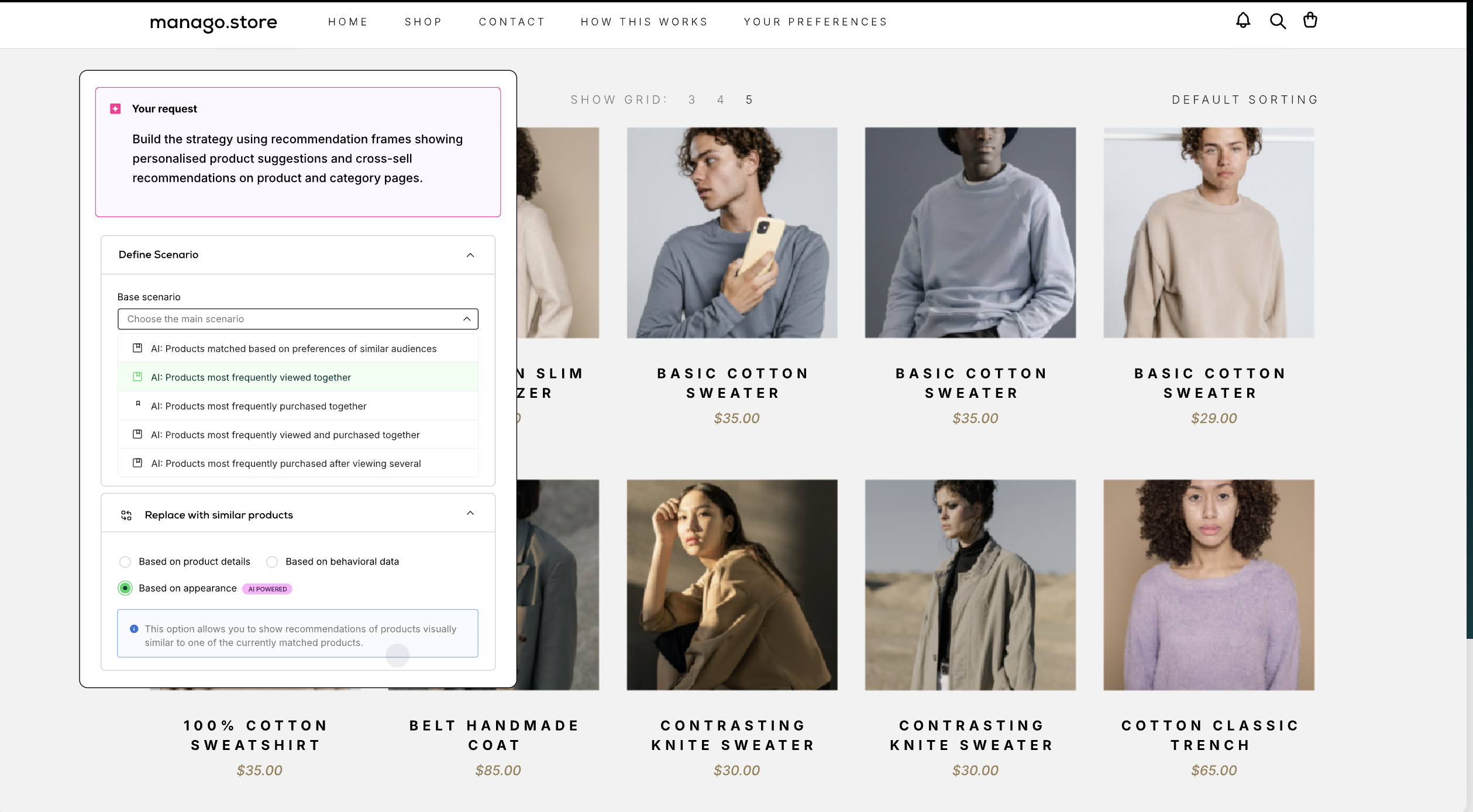
Replace with similar products can work in three ways: Based on product details, Based on behavioural data or Based on appearance. The last option uses AI-powered image recognition to find products with similar visual characteristics, including shapes, colours and patterns. It can be particularly useful in visually driven categories such as fashion, accessories or home décor, where similarity is not always captured well by catalogue attributes alone
A recommendation frame does not have to depend on one scenario. In the Advanced wizard, you can configure two or three scenarios and decide how they work together.
With Set main and fallback scenarios, the system takes as many recommendations as possible from Scenario A. If there are still empty slots, it moves to Scenario B and then Scenario C. With Distribute evenly, products are drawn approximately equally from the selected scenarios.
The recommended hierarchy is to start with the most specific scenario and make each fallback progressively broader. A custom model may therefore sit first, followed by a behavioural scenario and finally a more general catalogue-level option.
Fallbacks solve a practical problem. A recommendation can be relevant but still return too few usable products because of limited customer history, filters or stock availability. Without a fallback, those missing products become empty recommendation capacity. With the right hierarchy, the frame can continue selling even when the primary scenario cannot fill every slot.
The goal is not simply to fill space, though. A poorly chosen fallback can technically complete the frame while replacing good recommendations with products that have little connection to the customer's intent.
Availability is handled separately from recommendation logic. By default, only products with available=true and quantity>0 are displayed. You can choose to include unavailable products, but leaving this option disabled prevents recommendations from sending customers towards something they cannot buy.
Sorting is applied after the recommendation and availability rules have run. The remaining products can be ordered by price, discount, biggest discount, popularity, bestsellers first, new products first or any of the available detail fields.
The sequence is worth remembering because it explains a lot of unexpected results. The model recommends, the strategy filters and fills, availability removes products that cannot be purchased, and sorting determines how the surviving products are presented.
Consider a six-product recommendation frame on the homepage of a fashion store, configured in the Advanced wizard:
Scenario A, main: AI Recommendations using a model trained to maximise purchase likelihood.
Modifier: Filter → Exclude → main category Sale, because the placement is intended to promote full-price stock.
Scenario B, fallback 1: Recently viewed products.
Scenario C, fallback 2: Most frequently purchased products.
Product selection mode: Set main and fallback scenarios.
Sorting: Bestsellers first.
Unavailable products: disabled.
Anna visits the site. She has made two purchases during the past year, browsed outerwear last week and viewed four jackets yesterday. Recommendation Architect starts with Scenario A, where the AI model uses her purchase history and browsing behaviour to produce a ranked selection.
The Filter modifier then removes products belonging to the Sale category. Four recommendations remain, but two are out of stock. Because unavailable products are not allowed in this strategy, they are removed as well, leaving Scenario A to fill two of the six positions.
Four slots remain, so Recommendation Architect moves to Scenario B. Anna viewed four jackets yesterday and three of them are still available, which fills another three positions. Scenario C then supplies the final product using the Most frequently purchased products scenario.
Only after all six positions have been filled does sorting run. Products marked as bestsellers move towards the front regardless of whether they came from the AI model, recently viewed products or the general fallback. Anna therefore sees one recommendation row rather than three visibly separate recommendation groups.
Now consider somebody visiting the store for the first time. They are anonymous, this is their first session and they have viewed only three products.
AI-matched recommendations can still run for anonymous visitors, but the amount of information available to the model is smaller. As a result, it may return fewer recommendations and the fallback scenarios will do more of the work needed to fill the frame. Anna's frame might consist mainly of model-driven recommendations, while the anonymous visitor's frame may rely more heavily on Scenarios B and C.
The same strategy handles both situations, which matters because unidentified visitors often make up a large share of e-commerce traffic. Personalisation does not have to wait for an email address. If the visitor identifies themselves later, behaviour recorded during the anonymous session can be connected with their profile, meaning the first personalised communication after identification can already reflect what they did before subscribing. This is also where recommendations connect naturally with broader website personalisation, rather than operating as a standalone widget.
Once a strategy is complete, it can be saved to the Library and reused elsewhere. The same recommendation setup can, for example, appear in a website frame and inside an email template created in Email Design Studio.
This makes it easier to keep recommendation logic consistent across touchpoints. A customer can encounter the same underlying strategy on a product page, in an abandoned-cart email or in a web push notification without the marketing team maintaining separate copies for each placement.
There is one important consequence to keep in mind: when you edit a strategy in the Library, the change applies everywhere that strategy is currently used. If you change the strategy behind the homepage frame, you may also be changing the recommendation block used in a lifecycle email. If the intention is to create a variant for one placement rather than change the shared logic, duplicate the strategy first and edit the copy.
Recommendation analytics tracks views, clicks, transactions and revenue generated at both frame and strategy level. Several views are particularly useful when evaluating performance.
Check, if the fallback scenario supplies most of the frame most of the time, the main scenario may be more constrained than expected. An overly restrictive filter or poor stock availability are common reasons, and the frame may still look complete to the customer, which makes this easy to miss.
Second, compare a model-driven strategy with the rule-based strategy it replaced, using the same placement and a comparable period. This gives you a cleaner view of whether the model is improving the outcome rather than simply producing different recommendations.
Finally, combine the product-level results with the category coverage analysis described earlier. This shows which products customers respond to when the recommendation is based on actual behaviour rather than a merchandising plan created before the season started. That information can feed back into marketing, buying and assortment decisions.
Empik Foto is a good example of recommendations becoming part of the everyday customer journey rather than sitting in one product carousel. Its automated workflows included recommendations after purchase, while satisfaction surveys and other on-site interactions fed product recommendations on the website. That recommendation layer sat alongside cart recovery, segmentation and omnichannel campaigns. The wider programme delivered 201.24% growth in total transactions, 9% year-on-year growth in Average Order Value and 1,868% ROI. Those are results for the whole programme, not for recommendations in isolation, but they show the environment in which the recommendation logic was being used. Read the Empik Foto case study.
GOG.com came at the problem from a different starting point. Before implementation, the team could not use AI-driven product recommendations at scale and listed personalised recommendations among its objectives. The published case focuses more heavily on the personalised onboarding that followed, where behaviour such as genres viewed and games added to wishlists shaped the communication. That onboarding generated 7.8% more revenue than the control group, but it would be misleading to call that a recommendation result on its own. The GOG case study is more useful here as an example of why recommendation capability depends on behavioural data and the integration around it.
Monnari sits one step earlier. Its existing programme already uses behavioural and transactional segmentation, dynamic remarketing, post-purchase campaigns and personalisation, while AI Recommendations are a next growth opportunity, not as the source of the 5,621% ROI. That distinction is useful because recommendation models tend to become more valuable once the data and automation underneath them are already working. Read the Monnari case study.
The three examples are quite different, but that is probably the more useful lesson. Recommendations do not need to appear in the same place or play the same role for every brand. They become part of on-site personalisation, post-purchase automation, onboarding or product discovery depending on the customer journey around them.
The configuration can become detailed, but the business effect comes down to four practical changes.
A recommendation on a product page does not have to solve the same problem as one in a post-purchase email. One might optimise towards purchase probability, while another focuses on purchase value, product views.
Instead of applying one generic definition of relevance everywhere, the model can be trained around the job the placement is supposed to do.
Customers do not all arrive with the same amount of history. New visitors, sparse profiles and temporary stock gaps can all reduce the number of products available from the primary recommendation scenario.
Fallback hierarchies give the strategy somewhere sensible to go next, so a shortage in the main scenario does not have to become an empty frame or a row filled with arbitrary products.
Recommendations are available to anonymous visitors from their first session. Their activity can then become part of the customer profile after identification, allowing later communications to use behaviour collected before the visitor subscribed or purchased.
The value of that early browsing data is therefore not limited to the anonymous session itself.
A shared recommendation strategy can be used across web, email and push rather than recreated separately for every channel. At the same time, recommendation analytics shows how those strategies performz and which products customers respond to.
That makes the recommendation system useful not only for campaign execution but also as an ongoing source of demand and assortment insight.
Rules are useful when the relationship between products is already known and unlikely to change, but they describe what the team believed when the rule was written. AI Recommendations adds another source of information: what customers are actually doing now.
The model identifies patterns in behavioural, transactional and engagement data, while Recommendation Architect gives the marketing team control over the commercial constraints around those recommendations, including eligibility, fallback logic, availability and sorting.
The result is not a system where AI simply decides which products appear. It is a recommendation strategy where the model handles product relevance, the marketer defines the commercial objective and the rules around it, and analytics shows whether that combination is producing the result it was built for.
Rule-based scenarios apply logic someone wrote in advance, such as recently viewed products or products from a selected brand. AI Recommendations uses custom AI models trained on your database to find behavioural patterns nobody encoded manually. Both are configured as base scenarios in the Recommendation Architect, and a single strategy can combine them.
Each model is built for one business objective you define, such as boosting engagement, improving sales, or supporting retention, and trained on your own contact, transactional, and behavioural data. A model trained to maximise purchase likelihood and one trained to maximise order value will recommend different products to the same customer. There is no limit on how many models you can request, so different placements can run different objectives.
Three sources: transaction data recorded as purchase events, a product feed or catalogue, and website visit data. The models don't just count purchases and visits. They learn from the products behind them: brand, category, price, colour, descriptions and the additional attributes in your product feed/catalogue. That lets them connect what a customer did with the characteristics of your assortment.
Before a custom model is trained, an our team reviews the database to confirm the data is abundant and varied enough to support the objective you have set. Stores with limited transaction history can import historical transactions from their e-commerce platform first.
Yes, and the choice of modifier matters. Filter keeps or excludes products from the model's selection and leaves its reasoning intact. Replace with similar products swaps the selected products for others sharing an attribute, which can impair the calculations the model made. Modifiers also apply in sequence, each acting on the products matched by the previous step, so the order you add them in changes the result.
Yes. AI-matched recommendations run for anonymous website visitors as well as identified contacts, based on behaviour observed in previous sessions. When the visitor later identifies themselves, that behavioural history connects to their customer profile, so the first personalised message they receive reflects what they were doing before they subscribed.
The strategy falls back. In the Advanced wizard you set a main scenario and one or two fallbacks, and the system fills as many slots as it can from the main scenario before drawing on the fallbacks in order. The practice documented by Manago AI is to arrange scenarios from the most specific to the most general, so the frame stays full regardless of profile depth or stock position.
Recommendation analytics reports views, clicks, transactions, and generated revenue for each frame and strategy, so the comparison is run in the same placement over the same period. Judge it against the objective the model was trained for. A model optimised for order value can show lower click-through than its predecessor and still be the better commercial outcome.



'AI-powered' used to mean something. Now it comes as standard on fridges.At some point the phrase stopped describing technology and started describing marketing. It's everywhere. Didn’t Dyson just add it to electric toothbrushes? It's also on every marketing platform in your shortlist, which is the part that should bother you, because you&#...
Read more
ANIA KRUK is a Polish jewellery brand founded in 2012 that continues the 180-year family jewellery tradition which speaks through their products, emphasising lightness, simplicity, and unforced elegance.
Read more
For years, having the right martech stack could genuinely give a marketing team an advantage. One company had better automation, another had access to a platform its competitors had not yet adopted, and someone else had built a particularly effective setup around their CRM and campaign tools.AI is making that advantage less durable.
Read more